This is the multi-page printable view of this section.
Click here to print.
Return to the regular view of this page.
LESSONFUSE GUIDE
Lessonfuse at its core is a lesson plan generator that helps speed up the time teachers have to spend creating lesson plans to fit the standards detailed in the National Curriculum Framework.

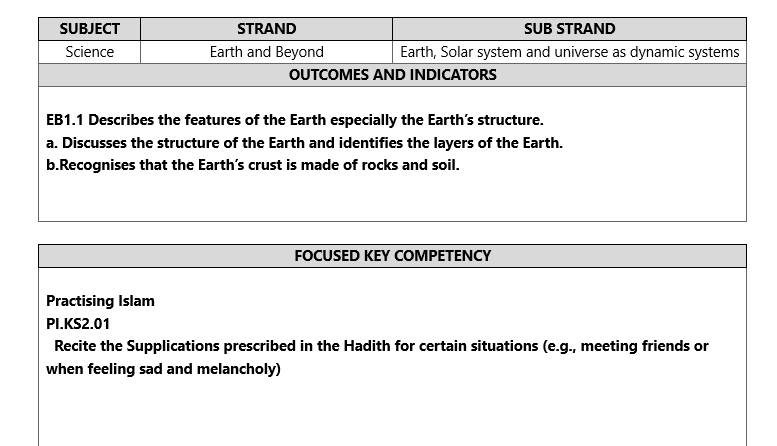
With lessonfuse, teachers can focus on the main lesson plan instead of focusing on filling the outcomes, indicators, Educational Competencies and their indicators.
Because with lessonfuse those details are already on the lesson plan and the teacher does not need to worry about them.
While this is the initial focus of lessonfuse, we are also looking to expand the functionality of lessonfuse to include other features that will help teachers in their day to day work.
One of those features is the use of AI. while AI is not the main focus of Lessonfuse we have seen that most of the teachers are interested in the use of AI in Lessonfuse rather than the manual mode.
1 - Credits
How credits work in Lessonfuse
Within Lessonfuse, credits are always spent at a rate of 1 credit per lesson plan. The pricing of credits are generally 5 MVR per credit. However, there are some exceptions to this rule for contributors.
Check out the pricing page for more information on the pricing of credits.

Credits are always visible from the top right corner of the app.
2 - Pricing
Our pricing decisions explained.
Lessonfuse is offering a yearly subscription for 600 MVR, a 70% discount from the average price teachers were willing to pay.
Discounted Pricing
Most of the teachers who are involved with the Lessonfuse project are eligible for various discounts. The following table shows the pricing for each group.
| Pricing Group |
Offer |
Price (Yearly) |
Free Credits |
Credit Rate |
| Contributors |
Free access |
- |
120 credits |
3 MVR / Credit |
| Dhivehi medium teachers |
50% discount |
300 MVR |
- |
- |
| Teachers who provided feedback |
+ 30 credits |
600 MVR |
150 credits |
5 MVR / Credit |
| Teachers who tested |
+ 10 credits |
600 MVR |
130 credits |
5 MVR / Credit |
| New users |
- |
600 MVR |
120 credits |
5 MVR / Credit |
Pricing Changes
We reserve the right to change the pricing at any time. Pricing changes will only effect new users. Existing users will be locked into the pricing they signed up for.
As Lessonfuse improves and adds more features, the price can be expected to increase as our costs will increase.
Refunds
We are unable to issue refunds at this time due to the nature of the product and the speed this service is being developed at. We may offer refunds in the future once we are more established.
3 - Why Lessonfuse
How it started and how we are structured.
Lessonfuse simplifies lesson plan creation in line with the National Curriculum Framework, eliminating the hassle of copying and pasting outcomes and indicators. It is the next step in the evolution of tools such as templates and excel sheets used by teachers.
The structure
Lessonfuse contributors update subjects with the latest National Curriculum Framework changes, enabling free access for them and up-to-date lesson plans for other teachers.
This effort also allows for a publicly accessible digitized version of the National Curriculum Framework and the development of more tools by other developers.
How it started
It started with excel templates that brought so much ease within the teachers of Maavashu Schools to the extent that they were willing to pay for it.
The manual mode is a direct reflection of those excel templates but expanded into the whole curriculum and served online for everyone.
3.1 - Digitization
Did the National Curriculum Framework need to be digitized?
The curriculum has been published in a PDF format. This is great for printing and sharing but not so great for building tools on top of it.
We plan to digitize the curriculum and make it available in a structured format that can be used by other developers to build tools on top of it.
3.2 - Recomendations
Our recommendations for the best experience with Lessonfuse.
These recommendations make sure you have the best experience with Lessonfuse.com.
Beyond that some of the recommendations are also the best technical solutions for teachers in our opinion.
Browser
Lessonfuse works great on all modern browsers.
Our recommendation is Brave Browser.

Office Suite
To open generated lesson plans, we recommend using the latest version of Office 365, which can be purchased for a group of 6 people for as little as 20 MVR per month per person. If paid yearly it is around 16 MVR per month per person.
With 365 you get the latest version of Office and 1TB of OneDrive storage along with a lot of premium features for word, excel, powerpoint and more.
Link to purchase Office 365 Family
Cracked software may contain viruses. Considering the low cost and the high daily use of the office suite for teachers we believe purchasing Office 365 is a wise choice for teachers.
4 - User Interface
Navigating the Lessonfuse interface
A lot of improvement will be made to the user interface as we move forward. This is the current state of the user interface.

4.1 - The Landing Page
The landing page of lessonfuse.com
This is the page on lessonfuse.com
There are two main buttons on the page.
One for Launching the application and one for viewing the documentation.
Once you click the Launch App button you will be taken to the login page if you are not already logged in.
See the login page for more information on the login process.
4.2 - Main Interface
The main interface of the lessonfuse app.
After you are logged in you will be taken to the main interface.
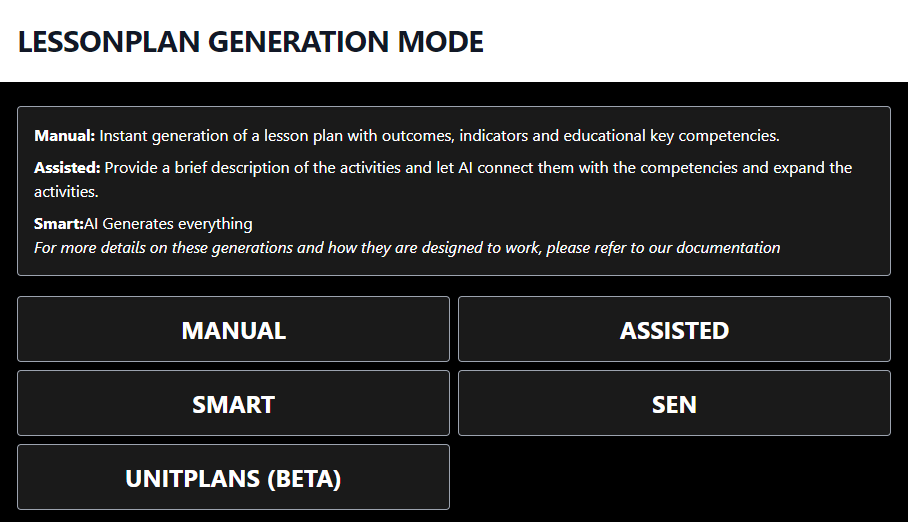
The main interface has a set of buttons along with a description at the top.
The buttons include, the generation modes and the unitplan button.
This will be divided up into sections soon.
You will also be redirected to the main interface if you click on the Home Menu item from the menu.
4.3 - The Menu
The menu on top of the page.
The menu on top has 3 main links. Home, History and Logout.
Home takes you back to the main interface.
History will show every lesson plan you have generated and their status and how long ago they were generated.
Logout will log you out of the application.
4.4 - History
The history page will show you all the lesson plans you have generated and their status.
The history page will show you all the lesson plans you have generated and their status.
The status will be one of the following:
- In Progress
- Completed
- Failed
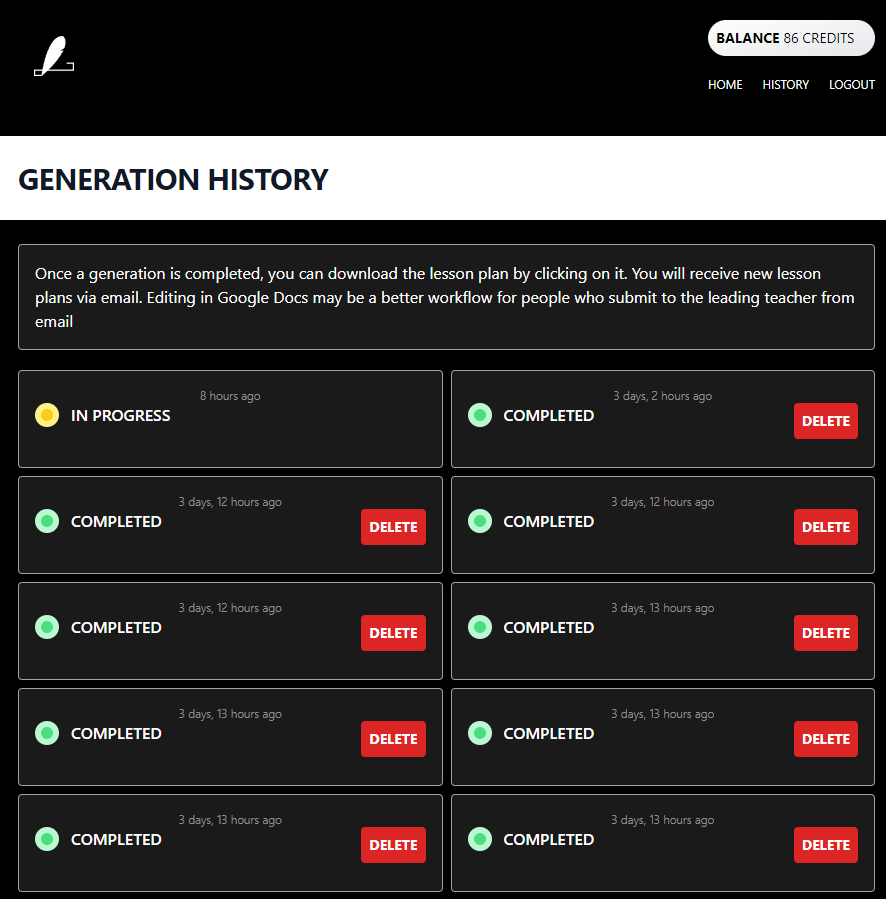
Lessonplans that are Completed and Failed can be deleted. Lessonplans that are In Progress cannot be deleted.
For completed you can click on the lessonplan and it will download the lessonplan in a word document format.
4.5 - login
How to login and register.
Login
The login process is entering the email and getting a link to your email.
Once you click the link you will be logged in.
If you are not registered you maybe redirected to our community message or the docs.
Registration
We have been asked to not make lessonfuse available for student teachers.
The only way to register is to contact us and pay the subscription fee.
You should also provide an edu.mv email address that belongs to a school.
You can contact us on viber / telegram on the number 7873673 to get access after paying the subscription fee.
See Pricing for more information.
5 - Generation Modes
The different generation modes in Lessonfuse.
Lessonfuse contains several generation modes. Each mode is designed to help teachers in different ways. The Lessonplan generations include:
- Manual Mode
- Assisted Mode
- Smart Mode
- Sen Mode
There are several repeated areas shared by all the modes.
The grade and subject selection
Users will select a grade first and then a subject. The subject selection will be limited to the subjects available for the selected grade.
The Substrand selection
Note that we skipped the strand selection. This is because lessonfuse automatically selects the strand based on the selected substrand.
In all subjects you will see a mixed mode as a substrand. This is a special substrand that contains all the outcomes and indicators for the subject. This is for situations like English where the strands are structured different from other subjects.
The Outcomes and Indicators
After the substrand is selected we will display the set of outcomes and indicators for that substrand. The user can tick the indicators and outcomes. Ticking an indicator will automatically tick the outcome it belongs to. Unticking an outcome will automatically untick all the indicators it belongs to.
Class duration and week
These fields are text fields which you can enter any value. In AI generation the duration you enter here is sent to the AI. So in theory you can create a lessonplan that spans for 24 hours.
This button will fill the optional fields with the default values. The optional fields will include every little bit of information that is in a lesson plan.
We would still recommend using word to edit the rest of the document, however should you wish to edit the complete lesson plan in lessonfuse, you can do so.
Educational Competencies
The educational competencies section include the educational competencies at first. Once you tick some of them and click Apply, the indicators for the selected educational competencies will be displayed.
You are expected to tick the indicators and proceed to the next step.
5.1 - Assisted Mode
Your activities but with the help of AI.
Assisted mode would require teachers to enter a general idea of focus for their lesson plans. The teachers would also be picking the Educational Competencies and their Indicators, just like manual mode.
The difference is that the AI would try to connect the general idea of focus with the Educational Competencies and their Indicators. If the teacher does not provide a lot of details in the focus section the AI would give more preference to the Outcomes, Educational Competencies and their Indicators over the focus.
Assisted mode is planned to be replaced with a new mode soon.
5.2 - Manual Mode
Instant lesson plans with all the outcomes and indicators prefilled.
The Manual Mode is for teachers who are not interested in AI generations. This is the initial mode that was created when lessonfuse started. You will be able to instantly download a prefilled template with all the outcomes and indicators already filled in.
5.3 - SEN Mode
For teachers catering to special education needs.
SEN mode was introduced to support SEN teachers who wanted to use Lessonfuse. It allows the teacher to describe the student and their needs, and replaces outcomes with a text field for the teacher to enter their own. The more details the teacher provides, the better the generation will be.
Fillable Fields
Describe the childs speacial needs
In here you can describe the childs special needs. The more details you enter the better the generation will be.
ICP Goals
This the icp goals section in the lesson plan
Outcomes
According to some SEN teachers, outcomes may be taken from a different grade. To avoid affecting user experience, we have temporarily replaced outcomes with a text field for teachers to enter their desired outcomes. We are seeking a better solution.
Class duration
This is the duration of the class.
Strand
This is the strand of the lesson. Only visible in Mixed mode.
Substrand
This is the substrand of the lesson. Only visible in Mixed mode.
Week
This is the week of the lesson
5.4 - Smart Mode
Let the AI do the work for you.
The smart mode requires the teachers to give just the outcomes and indicators. The rest is handled by the AI.
Some lessonplans made with smart mode are good enough to be used as is. But most of the time, the lessonplans made with smart mode should be used as a starting point for the teachers to edit and make it their own.
6 - Unitplans
Unitplans / Scheme of work are done at the beginning of the semester and are used to plan out the year.
Unitplans are now stable. There are two versions, labeled as New and Old.
The old system is still recommended for English and Dhivehi where strands work a little different compared to other subjects. This old system will be improved to cater Language subjects.
The new system works based on excel instead of word. By design each indicator is on a seperate row. For allocating multiple items into one lesson teachers are expected to combine the cells on the week column to indicate they belong to one week.
7 - Calender
A better academic calender
Storing calender in PDFs and word documents were great when smartphones were not as common.
Now that smartphones are owned by everyone, it is time to move to a better way of doing things.

Lessonfuse will be maintaining an iCal version of the same academic calender that is available on the Ministry of Education website.
This calender enables you to import it to google calender or any other mainstream calender app. This works on apple and android devices.
Essentially this means the academic calender will become events on the calender application on your phone. This is way better than finding the pdf and zooming in.
Most calender apps will also give you a notification before the event making this a better way to keep track of the academic calender events.
This calender is available publicly for everyone to use from lessonfuse.com/calender.
8 - Checklists
Few clicks, entire checklists
Checklists were something we planned to release in late september however, we decided to release it early as it was ready.

The checklists interface follows a new design, where everything is completed from one screen. This design will be later applied to the unitplans and lessonplans as well.

The way to use it is to simply select a grade and a subject and click generate.

At this time checklists are only sent to your email and there is no history as well. We will be adding these features in the future.
The checklists are locked
We locked the checklists to make it easier for the teachers to use. and to not make mistakes.
To unlock the password is lessonfuse

9 - Digitization Progress
Illustration of the progress of digitization of the National Curriculum Framework. Updates daily.
Lessonfuse is powered by the contributions of volunteer teachers also reffered to as contributors. The progress of digitization of the National Curriculum Framework is illustrated below. The progress is updated daily.
Any red colored (🟥) subject is not yet assigned to a contributor and up for grabs. If you are interested in contributing, please contact us. Contributors recieve free access to the platform forever as long as they are actively maintaining the content they are assigned to.
FULL PROGRESS REPORT
| Subject |
Grade 1 |
Grade 2 |
Grade 3 |
Grade 4 |
Grade 5 |
Grade 6 |
Grade 7 |
Grade 8 |
Grade 9 |
Grade 10 |
| Quran |
🟩 |
🟩 |
🟩 |
🟩 |
🟩 |
🟦 |
🟦 |
🟦 |
🟦 |
🟦 |
| Islam |
🟩 |
🟩 |
🟦 |
🟩 |
🟩 |
🟩 |
🟩 |
🟩 |
🟩 |
🟩 |
| Dhivehi |
🟩 |
🟩 |
🟩 |
🟩 |
🟩 |
🟩 |
🟩 |
🟩 |
🟦 |
🟦 |
| Arabic |
🟩 |
🟩 |
🟩 |
🟦 |
🟦 |
🟦 |
NA |
NA |
NA |
NA |
| English |
🟩 |
🟩 |
🟩 |
🟩 |
🟩 |
🟩 |
🟩 |
🟩 |
🟩 |
🟩 |
| Maths |
🟩 |
🟩 |
🟩 |
🟩 |
🟩 |
🟩 |
🟩 |
🟩 |
🟦 |
🟦 |
| Science |
🟩 |
🟩 |
🟩 |
🟩 |
🟩 |
🟩 |
🟩 |
🟩 |
NA |
NA |
| Social Studies |
🟩 |
🟩 |
🟩 |
🟩 |
🟩 |
🟩 |
🟩 |
🟩 |
NA |
NA |
| HPE |
🟩 |
🟩 |
🟩 |
🟩 |
🟩 |
🟩 |
🟩 |
🟦 |
NA |
NA |
| Creative Arts |
🟩 |
🟩 |
🟩 |
🟩 |
🟩 |
🟩 |
🟩 |
🟩 |
NA |
NA |
| Combined Business Studies |
NA |
NA |
NA |
NA |
NA |
NA |
🟩 |
🟩 |
NA |
NA |
| Accounting |
NA |
NA |
NA |
NA |
NA |
NA |
NA |
NA |
🟩 |
🟩 |
| Business |
NA |
NA |
NA |
NA |
NA |
NA |
NA |
NA |
🟩 |
🟩 |
| Economics |
NA |
NA |
NA |
NA |
NA |
NA |
NA |
NA |
🟦 |
🟦 |
| Physics |
NA |
NA |
NA |
NA |
NA |
NA |
NA |
NA |
🟦 |
🟦 |
| Chemistry |
NA |
NA |
NA |
NA |
NA |
NA |
NA |
NA |
🟩 |
🟩 |
| Biology |
NA |
NA |
NA |
NA |
NA |
NA |
NA |
NA |
🟩 |
🟩 |
| Computer Studies |
NA |
NA |
NA |
NA |
NA |
NA |
NA |
NA |
🟥 |
🟥 |
| Marine Science |
NA |
NA |
NA |
NA |
NA |
NA |
NA |
NA |
🟩 |
🟩 |
🟩 : Completed (87/106) - 82%
🟦 : Assigned to a contributor (19/106)
🟥 : Not yet assigned (2/106)
NA : Not applicable
Contributors
Below is a list of contributors and the subjects they are assigned to.
| Name |
School |
Subject |
Grade |
| Hawwa Nazla |
Maavashu School |
|
|
| Aishath Shahula |
Maavashu School |
|
|
| Huzaimath Moosa |
Maavashu School |
|
|
| Mariyam Rahuma |
Maavashu School |
|
|
| Aminath Hussain |
Maavashu School |
|
|
| Ramlath Zarudhee |
Maavashu School |
|
|
| Ifasha Hussain |
Maavashu School |
|
|
| Aminath Nahula |
Maavashu School |
|
|
| Mohamed Ali |
Maavashu School |
|
|
| Hawwa Aboobakuru |
Maavashu School |
|
|
| Aminath Rauza |
Maavashu School |
|
|
| Abdulla Naseem |
Maavashu School |
|
|
| Hussain Maajid |
Maavashu School |
|
|
| Fathimath Ismail |
Maavashu School |
|
|
| Mariyam Dhunya |
Maavashu School |
|
|
| Ahmed Busry |
Maaungoodhoo School |
|
|
| Ahmed Latheef |
Irushadhiyya School |
|
|
| Mariyam Maasitha |
Maaungoodhoo School |
|
|
Note: Subjects will be added soon.
10 - Roadmap
The future.
This is the roadmap for lessonfuse, the time references and features are not promises but rather a guide to what we are working on.
A lot of factors including user feedback, NIE and MOE requirements and other factors can potentially change the roadmap.
10.1 - Teacher Checklists
Checklists for each outcome
checklists have been implemented now. More information is on the dedicated checklists page.Checklists
10.2 - Templating System
Your own templates. The same Lessonfuse experience.
The templating system allows users to convert their lesson plans to a standard acceptable by Lessonfuse. As long as the standards are followed, the system will work with any lesson plan, including those with school logos. The standards do not affect the overall design of the template. The templating system is a priority and will be launched soon.
11 - Privacy Policy
Privacy policy for lessonfuse.com
We are committed to protecting your privacy. This privacy policy describes how we collect and use personal information about you when you visit our website or use our services.
Your school email address, phone number and IP addresses which you login from.
Your lesson plan data.
We use your school email address to verify that you are a teacher in Maldives.
We use your phone number to contact you if we need to.
We use your IP address to monitor your usage of our website and services.
We use your lesson plan data to further improve our services.
We dont. 🙂
12 - Terms of Service
Terms of service for lessonfuse.com
Welcome to Lessonfuse.com. By using our website and services, you agree to be bound by the following terms and conditions.
- Introduction
Lessonfuse.com is a lesson plan generator that helps teachers create lesson plans in line with the National Curriculum Framework. Our services are provided on an “as is” basis, without any warranties or guarantees.
- Eligibility
To use our services, you must be an employed teacher in Maldives in a registered school.
- Use of Services
You may use our services only for lawful purposes and in accordance with these terms and conditions. You may not use our services in any way that violates any applicable law or regulation.
- Intellectual Property
All content on our website, including but not limited to text, graphics, logos, and software, is the property of Lessonfuse.com or its licensors and is protected by intellectual property laws.
- User Content
You retain all rights in any content you submit to our website. By submitting content to our website, you grant us a non-exclusive, royalty-free, perpetual, irrevocable license to use, reproduce, modify, publish, distribute, and display such content on our website and through our services.
- Disclaimer of Warranties
Our services are provided on an “as is” basis without any warranties of any kind. We do not warrant that our services will be uninterrupted or error-free.
- Limitation of Liability
In no event will we be liable for any damages arising from your use of our services or from any information or content on our website.
- Indemnification
You agree to indemnify and hold harmless Lessonfuse.com and its affiliates from any claims or damages arising from your use of our services or from your breach of these terms and conditions.
- Changes to Terms and Conditions
We may revise these terms and conditions at any time by updating this page. Your continued use of our website and services after any changes constitutes your acceptance of the new terms.
- Governing Law
These terms and conditions are governed by the laws of Maldives
- Automation and Scraping
In no way should you use any automation or scraping tools to access our website. If you do so, we will block your IP address and you will not be able to access our website.
- Fair Use
We reserve the right to throttle your access to our website if we feel that you are using our website in a way that is not fair to other users. This includes behaviour such as generating all the lesson plans in a subject in a short period of time. All user behaviour is monitored and we will contact you if we feel that you are not using our website in a fair manner.
- Your Privacy
Your data is safe with us. We will never share your data with any party. We will use the data in a way where we can improve our services and provide you with a better experience.
- Payments
All payments are final. We do not offer refunds.